
In questo tutorial vedremo come applicare l'approccio API-first con Spring Boot 4 e l'ultima versione di OpenAPI Generator che lo supporta.
È utile sia per chi parte da un nuovo progetto sia per chi deve migrare da Spring Boot 3 a Spring Boot 4 e quindi alla nuova versione di OpenAPI Generator.
Progetteremo API per la risorsa book (per brevità implementeremo GET su singola risorsa, GET paginata e POST).
Trovi il codice completo sul repository Git: https://github.com/vincenzo-racca/boot4-apifirst.
L'approccio API-first
Quando si progettano le API, possiamo utilizzare due approcci:
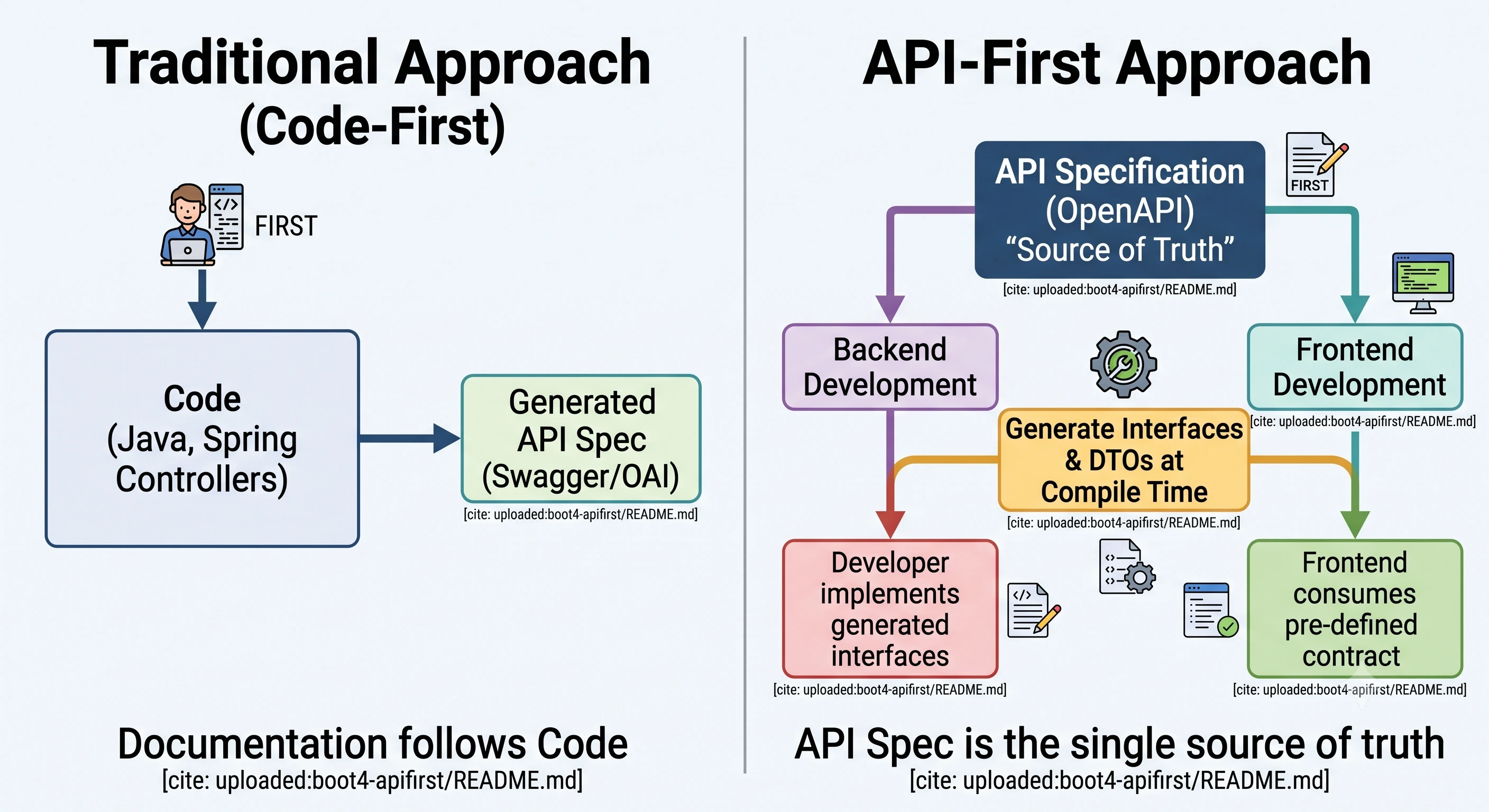
- Approccio tradizionale: le API vengono implementate dopo aver scritto il codice. Il file OpenAPI può essere generato dal codice esistente (ad esempio in Java, utilizzando le annotazioni di Swagger sulle classi).
- Approccio API-first: prima di scrivere il codice dell'applicazione, gli sviluppatori e gli stakeholder definiscono il contratto dell'API. Dal file OpenAPI così progettato il codice può poi essere generato da plugin come OpenAPI Generator.
Il secondo approccio presenta diversi vantaggi rispetto al primo. A differenza dell'approccio tradizionale, in cui si programma prima l'applicazione e poi se ne ricava l'API (spesso con scelte di design frettolose), l'API-first dà priorità alla progettazione fin dal primo momento, trattando le API come i veri e propri "mattoni" fondamentali del sistema anziché come un'aggiunta finale.
Inoltre, progettando prima il file OpenAPI, il contratto è disponibile da subito: i client possono iniziare l'integrazione senza aspettare lo sviluppo del server.
Il file OpenAPI
Il file OpenAPI book-openapi.yml è il seguente e possiamo incollarlo nella directory docs, da creare nella root del progetto.
Endpoints:
paths:
  /books:
    get:
      tags:
        - Books
      summary: Retrieve all books
      operationId: getAllBooks
      parameters:
        - name: page
          in: query
          description: Page number (starting from 0)
          required: false
          schema:
            type: integer
            minimum: 0
            default: 0

        - name: size
          in: query
          description: Number of items per page
          required: false
          schema:
            type: integer
            minimum: 1
            default: 20

        - name: sort
          in: query
          description: >
            Sorting criteria in the format `field,(asc|desc)`.
            Can be specified multiple times.
            Examples: `title,asc`, `author,desc`
          required: false
          explode: true
          schema:
            type: array
            items:
              type: string
          example:
            - title,asc
            - author,desc
      responses:
        '200':
          description: List of books retrieved successfully
          content:
            application/json:
              schema:
                $ref: '#/components/schemas/BookPage'
        '400':
          $ref: '#/components/responses/BadRequest'

    post:
      tags:
        - Books
      summary: Create a new book
      operationId: createBook
      requestBody:
        required: true
        content:
          application/json:
            schema:
              $ref: '#/components/schemas/CreateBookRequest'
      responses:
        '201':
          description: Book created successfully
          headers:
            Location:
              description: URI of the created book
              schema:
                type: string
                format: uri
        '400':
          $ref: '#/components/responses/BadRequest'
        '409':
          $ref: '#/components/responses/Conflict'

  /books/{isbn}:
    parameters:
      - name: isbn
        in: path
        required: true
        description: ISBN code of the book
        schema:
          type: string
          example: "9780132350884"

    get:
      tags:
        - Books
      summary: Retrieve a book by ISBN
      operationId: getBookByIsbn
      responses:
        '200':
          description: Book found
          content:
            application/json:
              schema:
                $ref: '#/components/schemas/BookResponse'
        '404':
          $ref: '#/components/responses/NotFound'
Schemas:
components:
  responses:
    BadRequest:
      description: Invalid request
      content:
        application/problem+json:
          schema:
            $ref: '#/components/schemas/ProblemDetail'

    Conflict:
      description: Book already exists
      content:
        application/problem+json:
          schema:
            $ref: '#/components/schemas/ProblemDetail'

    NotFound:
      description: Book not found
      content:
        application/problem+json:
          schema:
            $ref: '#/components/schemas/ProblemDetail'

  schemas:
    BookDto:
      type: object
      required:
        - bookType
        - isbn
        - title
        - author
      properties:
        bookType:
          type: string
          example: EBOOK
        isbn:
          type: string
          example: "9780132350884"
        title:
          type: string
          example: Clean Code
        author:
          type: string
          example: Robert C. Martin
        price:
          type: number
          example: 45.00
        publicationDate:
          type: string
          format: date
          example: "2008-08-01"
      discriminator:
        propertyName: bookType
        mapping:
          PAPERBACK: '#/components/schemas/PaperbackDto'
          EBOOK: '#/components/schemas/EBookDto'
          AUDIOBOOK: '#/components/schemas/AudioBookDto'

    PaperbackDto:
      description: Physical book; carries paperback-specific fields
      allOf:
        - $ref: '#/components/schemas/BookDto'
        - type: object
          required:
            - pages
          properties:
            pages:
              type: integer
              description: Number of physical pages
              example: 464
            weightGrams:
              type: number
              description: Weight of the book in grams
              example: 730.0

    EBookDto:
      description: Digital book; carries e-book-specific fields
      allOf:
        - $ref: '#/components/schemas/BookDto'
        - type: object
          required:
            - format
            - fileSizeMb
          properties:
            format:
              type: string
              description: Digital format
              example: EPUB
            fileSizeMb:
              type: number
              description: File size in MB
              example: 8.2

    AudioBookDto:
      description: Audio book; carries audiobook-specific fields
      allOf:
        - $ref: '#/components/schemas/BookDto'
        - type: object
          required:
            - narrator
            - durationMinutes
          properties:
            narrator:
              type: string
              description: Narrator name
              example: Luca Ward
            durationMinutes:
              type: integer
              description: Duration in minutes
              example: 450

    CreateBookRequest:
      oneOf:
        - $ref: '#/components/schemas/PaperbackDto'
        - $ref: '#/components/schemas/EBookDto'
        - $ref: '#/components/schemas/AudioBookDto'

    BookResponse:
      description: >
      oneOf:
        - $ref: '#/components/schemas/PaperbackDto'
        - $ref: '#/components/schemas/EBookDto'
        - $ref: '#/components/schemas/AudioBookDto'

    BookPage:
      type: object
      properties:
        content:
          type: array
          items:
            $ref: '#/components/schemas/BookResponse'

        pageable:
          $ref: '#/components/schemas/Pageable'

        totalElements:
          type: integer
          format: int64
          example: 100

        totalPages:
          type: integer
          example: 5

        size:
          type: integer
          example: 20

        number:
          type: integer
          example: 0

        numberOfElements:
          type: integer
          example: 20

        first:
          type: boolean
          example: true

        last:
          type: boolean
          example: false

        empty:
          type: boolean
          example: false

    Pageable:
      type: object
      properties:
        pageNumber:
          type: integer
          example: 0

        pageSize:
          type: integer
          example: 20

        offset:
          type: integer
          format: int64
          example: 0

        paged:
          type: boolean
          example: true

        unpaged:
          type: boolean
          example: false

    ProblemDetail:
      type: object
      properties:
        type:
          type: string
          format: uri
          example: about:blank
        title:
          type: string
          example: Bad Request
        status:
          type: integer
          example: 400
        detail:
          type: string
          example: Invalid request
        instance:
          type: string
          format: uri
          example: /api/books
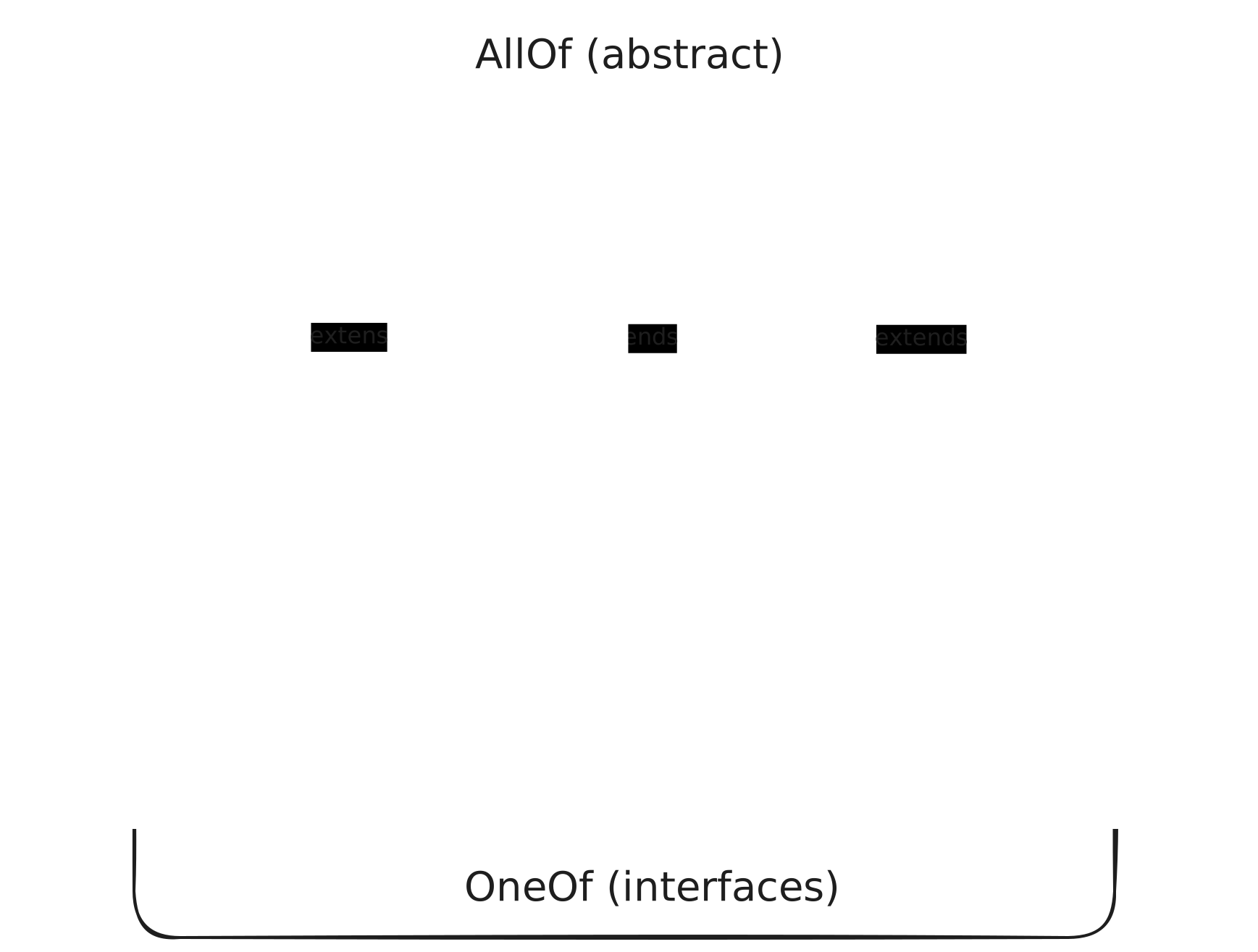
Nota che sfruttiamo il polimorfismo della specifica OpenAPI tramite il campo discriminator bookType.
La risorsa book può quindi essere di tre tipi: PaperbackDto, EBookDto o AudioBookDto.
I DTO CreateBookRequest e BookResponse, invece, sono "contenitori" di BookDto e non sottotipi, quindi usano oneOf anziché allOf.
Da questa specifica il plugin genererà la classe astratta BookDto, estesa dalle classi concrete PaperbackDto, EBookDto e AudioBookDto, e le interfacce CreateBookRequest e BookResponse, implementate dagli stessi DTO concreti.
Per la paginazione abbiamo implementato un DTO simile a quello restituito da Spring Data REST. Essendo un DTO custom, può avere più o meno campi rispetto a quello di Spring: un mapping (realizzato qui con la libreria MapStruct) converte il DTO di Spring in quello custom.
Creazione del progetto
Possiamo usare il seguente comando per scaricare lo scheletro del progetto:
curl https://start.spring.io/starter.zip -d groupId=com.vincenzoracca \
      -d artifactId=boot4-apifirst \
      -d name=boot4-apifirst \
      -d packageName=com.vincenzoracca.boot4apifirst \
      -d dependencies=web,validation,spring-restclient,opentelemetry,actuator,h2,data-jdbc \
      -d javaVersion=25 -d bootVersion=4.1.0 -d type=maven-project -o boot4-apifirst.zip
Le dipendenze rilevanti sono:
- spring-boot-starter-webmvc: è la nuova dipendenza di Spring Boot 4 per creare API REST con l'approccio Servlet e non Reactive (sostituisce spring-boot-starter-web).
- spring-boot-starter-restclient: poiché Spring Boot 4 usa un approccio più modulare, i client REST RestClient e RestTemplate hanno una dipendenza dedicata. Non useremo questa dipendenza nel progetto. L'ho inclusa solo per sottolineare il nuovo approccio di Spring Boot 4.
- spring-boot-starter-validation: dipendenza necessaria per applicare la validazione Java sulle API. Quando una chiamata a un nostro endpoint non rispetta i parametri richiesti (ad esempio mancano parametri obbligatori), Spring genererà automaticamente un 400 Bad Request. Dipendenza necessaria anche per l'utilizzo del plugin di OpenAPI Generator.
- spring-boot-starter-opentelemetry: utilizzata per il tracing delle API con OpenTelemetry.
Il resto delle dipendenze è poco rilevante. Useremo H2 come database in-memory e Spring Data JDBC per interfacciarci al nostro database.
Aggiunta del plugin OpenAPI Generator
Aggiungiamo nel pom.xml la versione 7.20.0 del plugin di OpenAPI Generator che supporta Spring Boot 4:
<plugin>
    <groupId>org.openapitools</groupId>
    <artifactId>openapi-generator-maven-plugin</artifactId>
    <version>7.20.0</version>
    <executions>
        <execution>
            <id>generate-book-api</id>
            <goals>
                <goal>generate</goal>
            </goals>
            <configuration>
                <inputSpec>${project.basedir}/docs/openapi/book-openapi.yml</inputSpec>
                <generatorName>spring</generatorName>
                <configOptions>
                    <interfaceOnly>true</interfaceOnly>
                    <openApiNullable>false</openApiNullable>
                    <useSpringBoot4>true</useSpringBoot4>
                    <useJackson3>true</useJackson3>
                    <documentationProvider>none</documentationProvider>
                    <annotationLibrary>none</annotationLibrary>
                    <apiPackage>com.vincenzoracca.boot4.api.generated</apiPackage>
                    <modelPackage>com.vincenzoracca.boot4.model.generated</modelPackage>
                </configOptions>
            </configuration>
        </execution>
    </executions>
</plugin>
Analizziamo le configurazioni del plugin:
- interfaceOnly=true: permette di generare solo le interfacce delle API senza i metodi stub. Segue l'approccio API-first.
- openApiNullable=false: permette di non richiedere la libreria Jackson Nullable, che serve a distinguere se un campo è null oppure non è presente nel payload.
- useSpringBoot4=true: permette di generare le classi per Spring Boot 4. Implicitamente imposta useJackson3=true e useJakartaEe=true.
- useJackson3=true: permette al generatore di usare le librerie di Jackson 3, utilizzate di default da Spring Boot 4.
- documentationProvider=none: disabilita il provider della documentazione delle API tramite annotazioni. Impostandola a none, non vogliamo creare annotazioni: nell'approccio tradizionale dalle annotazioni si può generare il file OpenAPI.
- annotationLibrary=none: stessa cosa di sopra, ma con documentazione aggiuntiva tramite Swagger 1 o Swagger 2.
Generazione delle classi
Per generare le classi model e API dal plugin, dalla root del progetto eseguiamo il comando ./mvnw clean compile.
Vediamo le classi autogenerate. L'unica interfaccia API è la seguente:
@Validated
public interface BooksApi {
    String PATH_CREATE_BOOK = "/books";
    String PATH_GET_ALL_BOOKS = "/books";
    String PATH_GET_BOOK_BY_ISBN = "/books/{isbn}";


    @RequestMapping(
        method = {RequestMethod.POST},
        value = {"/books"},
        produces = {"application/problem+json"},
        consumes = {"application/json"}
    )
    default ResponseEntity<Void> createBook(@RequestBody @Valid CreateBookRequest createBookRequest) {
      // ...
    }

    @RequestMapping(
        method = {RequestMethod.GET},
        value = {"/books"},
        produces = {"application/json", "application/problem+json"}
    )
    default ResponseEntity<BookPage> getAllBooks(@RequestParam(value = "page",required = false,defaultValue = "0") @Min(0L) @Valid Integer page, @RequestParam(value = "size",required = false,defaultValue = "20") @Min(1L) @Valid Integer size, @RequestParam(value = "sort",required = false) @Nullable @Valid List<String> sort) {
      // ...
    }

    @RequestMapping(
        method = {RequestMethod.GET},
        value = {"/books/{isbn}"},
        produces = {"application/json", "application/problem+json"}
    )
    default ResponseEntity<BookResponse> getBookByIsbn(@PathVariable("isbn") @NotNull String isbn) {
        // ...
    }
}
Questa è l'interfaccia che dobbiamo implementare nella nostra classe Controller:
@RestController
public class BookingController implements BooksApi {

    private final BookService bookService;

    public BookingController(BookService bookService) {
        this.bookService = bookService;
    }

    @Override
    public ResponseEntity<Void> createBook(CreateBookRequest request) {
        Book saved = bookService.save(request);
        URI uri = ServletUriComponentsBuilder
                .fromCurrentRequest()
                .path("/{isbn}")
                .buildAndExpand(saved.isbn())
                .toUri();

        return ResponseEntity.created(uri).build();
    }

    @Override
    public ResponseEntity<BookResponse> getBookByIsbn(String isbn) {
        BookResponse response = bookService.findByIsbn(isbn);
        return ResponseEntity.ok(response);
    }

    @Override
    public ResponseEntity<BookPage> getAllBooks(
            Integer page,
            Integer size,
            List<String> sort
    ) {
        BookPage bookPage = bookService.findAll(page, size, sort);
        return ResponseEntity.ok(bookPage);
    }
}
I modelli generati sono:
@JsonIgnoreProperties(
    value = {"bookType"},
    allowSetters = true
)
@JsonTypeInfo(
    use = Id.NAME,
    include = As.PROPERTY,
    property = "bookType",
    visible = true
)
@JsonSubTypes({@Type(
    value = AudioBookDto.class,
    name = "AUDIOBOOK"
), @Type(
    value = EBookDto.class,
    name = "EBOOK"
), @Type(
    value = PaperbackDto.class,
    name = "PAPERBACK"
)})
public class BookDto {
    // ...
}

@JsonIgnoreProperties(
        value = {"bookType"},
        allowSetters = true
)
@JsonTypeInfo(
        use = Id.NAME,
        include = As.PROPERTY,
        property = "bookType",
        visible = true
)
@JsonSubTypes({@Type(
        value = AudioBookDto.class,
        name = "AUDIOBOOK"
), @Type(
        value = EBookDto.class,
        name = "EBOOK"
), @Type(
        value = PaperbackDto.class,
        name = "PAPERBACK"
)})
public interface BookResponse {
  String getBookType();
}

// CreateBookRequest is equivalent to BookResponse

public class PaperbackDto extends BookDto implements BookResponse, CreateBookRequest {
    // ...
}

// EBookDto and AudioBookDto have the same structure as PaperbackDto
Conclusioni
In questo tutorial abbiamo applicato l'approccio API-first con Spring Boot 4 e OpenAPI Generator 7.20.0, partendo dal contratto OpenAPI per generare automaticamente interfacce e modelli. Al controller resta così solo la logica applicativa, mentre il contratto rimane l'unica fonte di verità condivisa tra server e client.
Abbiamo anche visto come modellare il polimorfismo con il discriminator e come configurare il plugin per Spring Boot 4 (Jackson 3, Jakarta EE e generazione delle sole interfacce).
Questo approccio richiede più cura nella specifica iniziale, ma ripaga con API più coerenti, meno ambiguità di integrazione e una migrazione a Spring Boot 4 più lineare. Trovi il codice completo sul repository GitHub.
Se vuoi approfondire la progettazione delle API, con architettura ed esempi pratici, ho scritto il libro Spring Boot 3 API Mastery, disponibile su Amazon.
...