
In this tutorial we'll see how to apply the API-first approach with Spring Boot 4 and the latest version of OpenAPI Generator that supports it.
It's useful both for those starting a new project and for those who need to migrate from Spring Boot 3 to Spring Boot 4 and therefore to the new version of OpenAPI Generator.
We'll design APIs for the book resource (for brevity we'll implement GET on a single resource, paginated GET and POST).
You can find the complete code in the Git repository: https://github.com/vincenzo-racca/boot4-apifirst.
The API-first approach
When designing APIs, we can take two approaches:
- Traditional approach: the APIs are implemented after writing the code. The OpenAPI file can be generated from the existing code (for example in Java, using Swagger annotations on the classes).
- API-first approach: before writing the application code, developers and stakeholders define the API contract. From the resulting OpenAPI file the code can then be generated by plugins such as OpenAPI Generator.
The second approach has several advantages over the first. Unlike the traditional approach, where you first program the application and then derive the API from it (often with hasty design choices), API-first prioritizes design from the very beginning, treating the APIs as the true fundamental "building blocks" of the system rather than as a final add-on.
Moreover, by designing the OpenAPI file first, the contract is immediately available: clients can start the integration without waiting for the server to be developed.

The OpenAPI file
The OpenAPI file book-openapi.yml is shown below and we can place it in the docs directory, to be created in the project root.
Endpoints:
paths:
  /books:
    get:
      tags:
        - Books
      summary: Retrieve all books
      operationId: getAllBooks
      parameters:
        - name: page
          in: query
          description: Page number (starting from 0)
          required: false
          schema:
            type: integer
            minimum: 0
            default: 0

        - name: size
          in: query
          description: Number of items per page
          required: false
          schema:
            type: integer
            minimum: 1
            default: 20

        - name: sort
          in: query
          description: >
            Sorting criteria in the format `field,(asc|desc)`.
            Can be specified multiple times.
            Examples: `title,asc`, `author,desc`
          required: false
          explode: true
          schema:
            type: array
            items:
              type: string
          example:
            - title,asc
            - author,desc
      responses:
        '200':
          description: List of books retrieved successfully
          content:
            application/json:
              schema:
                $ref: '#/components/schemas/BookPage'
        '400':
          $ref: '#/components/responses/BadRequest'

    post:
      tags:
        - Books
      summary: Create a new book
      operationId: createBook
      requestBody:
        required: true
        content:
          application/json:
            schema:
              $ref: '#/components/schemas/CreateBookRequest'
      responses:
        '201':
          description: Book created successfully
          headers:
            Location:
              description: URI of the created book
              schema:
                type: string
                format: uri
        '400':
          $ref: '#/components/responses/BadRequest'
        '409':
          $ref: '#/components/responses/Conflict'

  /books/{isbn}:
    parameters:
      - name: isbn
        in: path
        required: true
        description: ISBN code of the book
        schema:
          type: string
          example: "9780132350884"

    get:
      tags:
        - Books
      summary: Retrieve a book by ISBN
      operationId: getBookByIsbn
      responses:
        '200':
          description: Book found
          content:
            application/json:
              schema:
                $ref: '#/components/schemas/BookResponse'
        '404':
          $ref: '#/components/responses/NotFound'
Schemas:
components:
  responses:
    BadRequest:
      description: Invalid request
      content:
        application/problem+json:
          schema:
            $ref: '#/components/schemas/ProblemDetail'

    Conflict:
      description: Book already exists
      content:
        application/problem+json:
          schema:
            $ref: '#/components/schemas/ProblemDetail'

    NotFound:
      description: Book not found
      content:
        application/problem+json:
          schema:
            $ref: '#/components/schemas/ProblemDetail'

  schemas:
    BookDto:
      type: object
      required:
        - bookType
        - isbn
        - title
        - author
      properties:
        bookType:
          type: string
          example: EBOOK
        isbn:
          type: string
          example: "9780132350884"
        title:
          type: string
          example: Clean Code
        author:
          type: string
          example: Robert C. Martin
        price:
          type: number
          example: 45.00
        publicationDate:
          type: string
          format: date
          example: "2008-08-01"
      discriminator:
        propertyName: bookType
        mapping:
          PAPERBACK: '#/components/schemas/PaperbackDto'
          EBOOK: '#/components/schemas/EBookDto'
          AUDIOBOOK: '#/components/schemas/AudioBookDto'

    PaperbackDto:
      description: Physical book; carries paperback-specific fields
      allOf:
        - $ref: '#/components/schemas/BookDto'
        - type: object
          required:
            - pages
          properties:
            pages:
              type: integer
              description: Number of physical pages
              example: 464
            weightGrams:
              type: number
              description: Weight of the book in grams
              example: 730.0

    EBookDto:
      description: Digital book; carries e-book-specific fields
      allOf:
        - $ref: '#/components/schemas/BookDto'
        - type: object
          required:
            - format
            - fileSizeMb
          properties:
            format:
              type: string
              description: Digital format
              example: EPUB
            fileSizeMb:
              type: number
              description: File size in MB
              example: 8.2

    AudioBookDto:
      description: Audio book; carries audiobook-specific fields
      allOf:
        - $ref: '#/components/schemas/BookDto'
        - type: object
          required:
            - narrator
            - durationMinutes
          properties:
            narrator:
              type: string
              description: Narrator name
              example: Luca Ward
            durationMinutes:
              type: integer
              description: Duration in minutes
              example: 450

    CreateBookRequest:
      oneOf:
        - $ref: '#/components/schemas/PaperbackDto'
        - $ref: '#/components/schemas/EBookDto'
        - $ref: '#/components/schemas/AudioBookDto'

    BookResponse:
      description: >
      oneOf:
        - $ref: '#/components/schemas/PaperbackDto'
        - $ref: '#/components/schemas/EBookDto'
        - $ref: '#/components/schemas/AudioBookDto'

    BookPage:
      type: object
      properties:
        content:
          type: array
          items:
            $ref: '#/components/schemas/BookResponse'

        pageable:
          $ref: '#/components/schemas/Pageable'

        totalElements:
          type: integer
          format: int64
          example: 100

        totalPages:
          type: integer
          example: 5

        size:
          type: integer
          example: 20

        number:
          type: integer
          example: 0

        numberOfElements:
          type: integer
          example: 20

        first:
          type: boolean
          example: true

        last:
          type: boolean
          example: false

        empty:
          type: boolean
          example: false

    Pageable:
      type: object
      properties:
        pageNumber:
          type: integer
          example: 0

        pageSize:
          type: integer
          example: 20

        offset:
          type: integer
          format: int64
          example: 0

        paged:
          type: boolean
          example: true

        unpaged:
          type: boolean
          example: false

    ProblemDetail:
      type: object
      properties:
        type:
          type: string
          format: uri
          example: about:blank
        title:
          type: string
          example: Bad Request
        status:
          type: integer
          example: 400
        detail:
          type: string
          example: Invalid request
        instance:
          type: string
          format: uri
          example: /api/books
Note that we leverage the polymorphism of the OpenAPI specification through the bookType discriminator field.
The book resource can therefore be one of three types: PaperbackDto, EBookDto or AudioBookDto.
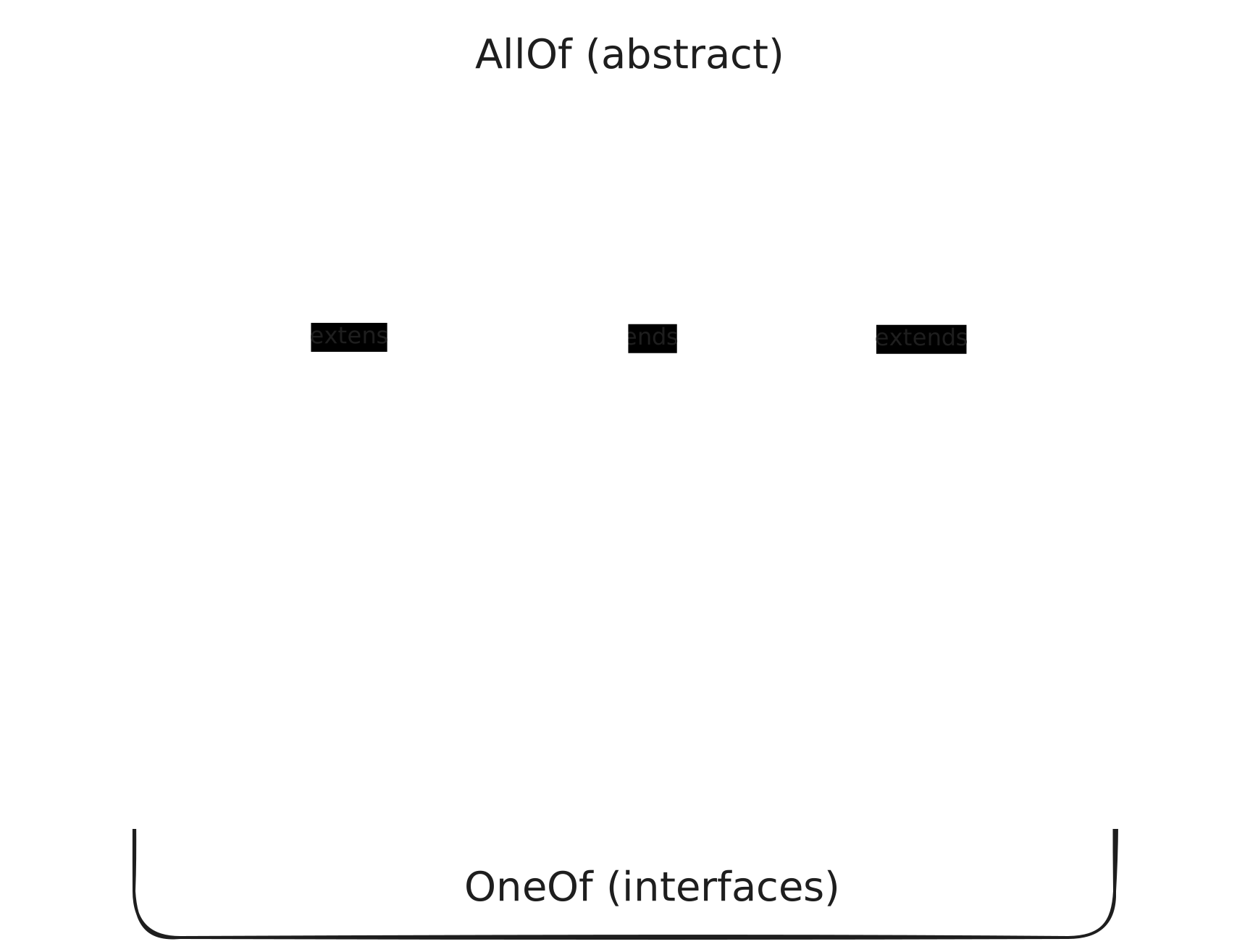
The CreateBookRequest and BookResponse DTOs, on the other hand, are "containers" of BookDto and not subtypes, so they use oneOf instead of allOf.
From this specification the plugin will generate the abstract class BookDto, extended by the concrete classes PaperbackDto, EBookDto and AudioBookDto, and the interfaces CreateBookRequest and BookResponse, implemented by the same concrete DTOs.
For pagination we implemented a DTO similar to the one returned by Spring Data REST. Being a custom DTO, it can have more or fewer fields than Spring's one: a mapping (built here with the MapStruct library) converts Spring's DTO into the custom one.
Creating the project
We can use the following command to download the project skeleton:
curl https://start.spring.io/starter.zip -d groupId=com.vincenzoracca \
      -d artifactId=boot4-apifirst \
      -d name=boot4-apifirst \
      -d packageName=com.vincenzoracca.boot4apifirst \
      -d dependencies=web,validation,spring-restclient,opentelemetry,actuator,h2,data-jdbc \
      -d javaVersion=25 -d bootVersion=4.1.0 -d type=maven-project -o boot4-apifirst.zip
The relevant dependencies are:
- spring-boot-starter-webmvc: it's the new Spring Boot 4 dependency for creating REST APIs with the Servlet approach, not Reactive (it replaces spring-boot-starter-web).
- spring-boot-starter-restclient: since Spring Boot 4 uses a more modular approach, the REST clients RestClient and RestTemplate have a dedicated dependency. We won't use this dependency in the project. I included it only to highlight the new Spring Boot 4 approach.
- spring-boot-starter-validation: dependency required to apply Java validation on the APIs. When a call to one of our endpoints doesn't respect the required parameters (for example, mandatory parameters are missing), Spring will automatically generate a 400 Bad Request. This dependency is also required to use the OpenAPI Generator plugin.
- spring-boot-starter-opentelemetry: used for API tracing with OpenTelemetry.
The rest of the dependencies is not very relevant. We'll use H2 as an in-memory database and Spring Data JDBC to interface with our database.
Adding the OpenAPI Generator plugin
Let's add to the pom.xml version 7.20.0 of the OpenAPI Generator plugin, which supports Spring Boot 4:
<plugin>
    <groupId>org.openapitools</groupId>
    <artifactId>openapi-generator-maven-plugin</artifactId>
    <version>7.20.0</version>
    <executions>
        <execution>
            <id>generate-book-api</id>
            <goals>
                <goal>generate</goal>
            </goals>
            <configuration>
                <inputSpec>${project.basedir}/docs/openapi/book-openapi.yml</inputSpec>
                <generatorName>spring</generatorName>
                <configOptions>
                    <interfaceOnly>true</interfaceOnly>
                    <openApiNullable>false</openApiNullable>
                    <useSpringBoot4>true</useSpringBoot4>
                    <useJackson3>true</useJackson3>
                    <documentationProvider>none</documentationProvider>
                    <annotationLibrary>none</annotationLibrary>
                    <apiPackage>com.vincenzoracca.boot4.api.generated</apiPackage>
                    <modelPackage>com.vincenzoracca.boot4.model.generated</modelPackage>
                </configOptions>
            </configuration>
        </execution>
    </executions>
</plugin>
Let's analyze the plugin configuration:
- interfaceOnly=true: lets you generate only the API interfaces without the stub methods. It follows the API-first approach.
- openApiNullable=false: lets you avoid requiring the Jackson Nullable library, which is used to distinguish whether a field is null or not present in the payload.
- useSpringBoot4=true: lets you generate the classes for Spring Boot 4. It implicitly sets useJackson3=true and useJakartaEe=true.
- useJackson3=true: lets the generator use the Jackson 3 libraries, used by default in Spring Boot 4.
- documentationProvider=none: disables the API documentation provider via annotations. By setting it to none, we don't want to create annotations: in the traditional approach the OpenAPI file can be generated from the annotations.
- annotationLibrary=none: same as above, but with additional documentation via Swagger 1 or Swagger 2.
Generating the classes
To generate the model and API classes from the plugin, run the command ./mvnw clean compile from the project root.
Let's look at the generated classes. The only API interface is the following:
@Validated
public interface BooksApi {
    String PATH_CREATE_BOOK = "/books";
    String PATH_GET_ALL_BOOKS = "/books";
    String PATH_GET_BOOK_BY_ISBN = "/books/{isbn}";


    @RequestMapping(
        method = {RequestMethod.POST},
        value = {"/books"},
        produces = {"application/problem+json"},
        consumes = {"application/json"}
    )
    default ResponseEntity<Void> createBook(@RequestBody @Valid CreateBookRequest createBookRequest) {
      // ...
    }

    @RequestMapping(
        method = {RequestMethod.GET},
        value = {"/books"},
        produces = {"application/json", "application/problem+json"}
    )
    default ResponseEntity<BookPage> getAllBooks(@RequestParam(value = "page",required = false,defaultValue = "0") @Min(0L) @Valid Integer page, @RequestParam(value = "size",required = false,defaultValue = "20") @Min(1L) @Valid Integer size, @RequestParam(value = "sort",required = false) @Nullable @Valid List<String> sort) {
      // ...
    }

    @RequestMapping(
        method = {RequestMethod.GET},
        value = {"/books/{isbn}"},
        produces = {"application/json", "application/problem+json"}
    )
    default ResponseEntity<BookResponse> getBookByIsbn(@PathVariable("isbn") @NotNull String isbn) {
        // ...
    }
}
This is the interface we need to implement in our Controller class:
@RestController
public class BookingController implements BooksApi {

    private final BookService bookService;

    public BookingController(BookService bookService) {
        this.bookService = bookService;
    }

    @Override
    public ResponseEntity<Void> createBook(CreateBookRequest request) {
        Book saved = bookService.save(request);
        URI uri = ServletUriComponentsBuilder
                .fromCurrentRequest()
                .path("/{isbn}")
                .buildAndExpand(saved.isbn())
                .toUri();

        return ResponseEntity.created(uri).build();
    }

    @Override
    public ResponseEntity<BookResponse> getBookByIsbn(String isbn) {
        BookResponse response = bookService.findByIsbn(isbn);
        return ResponseEntity.ok(response);
    }

    @Override
    public ResponseEntity<BookPage> getAllBooks(
            Integer page,
            Integer size,
            List<String> sort
    ) {
        BookPage bookPage = bookService.findAll(page, size, sort);
        return ResponseEntity.ok(bookPage);
    }
}
The generated models are:
@JsonIgnoreProperties(
    value = {"bookType"},
    allowSetters = true
)
@JsonTypeInfo(
    use = Id.NAME,
    include = As.PROPERTY,
    property = "bookType",
    visible = true
)
@JsonSubTypes({@Type(
    value = AudioBookDto.class,
    name = "AUDIOBOOK"
), @Type(
    value = EBookDto.class,
    name = "EBOOK"
), @Type(
    value = PaperbackDto.class,
    name = "PAPERBACK"
)})
public class BookDto {
    // ...
}

@JsonIgnoreProperties(
        value = {"bookType"},
        allowSetters = true
)
@JsonTypeInfo(
        use = Id.NAME,
        include = As.PROPERTY,
        property = "bookType",
        visible = true
)
@JsonSubTypes({@Type(
        value = AudioBookDto.class,
        name = "AUDIOBOOK"
), @Type(
        value = EBookDto.class,
        name = "EBOOK"
), @Type(
        value = PaperbackDto.class,
        name = "PAPERBACK"
)})
public interface BookResponse {
  String getBookType();
}

// CreateBookRequest is equivalent to BookResponse

public class PaperbackDto extends BookDto implements BookResponse, CreateBookRequest {
    // ...
}

// EBookDto and AudioBookDto have the same structure as PaperbackDto
Conclusions
In this tutorial we applied the API-first approach with Spring Boot 4 and OpenAPI Generator 7.20.0, starting from the OpenAPI contract to automatically generate interfaces and models. The controller is thus left with only the application logic, while the contract remains the single source of truth shared between server and client.
We also saw how to model polymorphism with the discriminator and how to configure the plugin for Spring Boot 4 (Jackson 3, Jakarta EE and generation of interfaces only).
This approach requires more care in the initial specification, but it pays off with more consistent APIs, fewer integration ambiguities and a smoother migration to Spring Boot 4. You can find the complete code in the GitHub repository.
If you're interested in diving deeper into API design, with architecture and practical examples, I wrote the book Spring Boot 3 API Mastery, available on Amazon.
Comments